The Weekly Client Report, Written by an Agent Every Monday Before You Wake Up
Build a weekly client report that an agent compiles from Shager: what was published, what failed, clicks per account and post, and how to join it to CRM leads.
7 min read
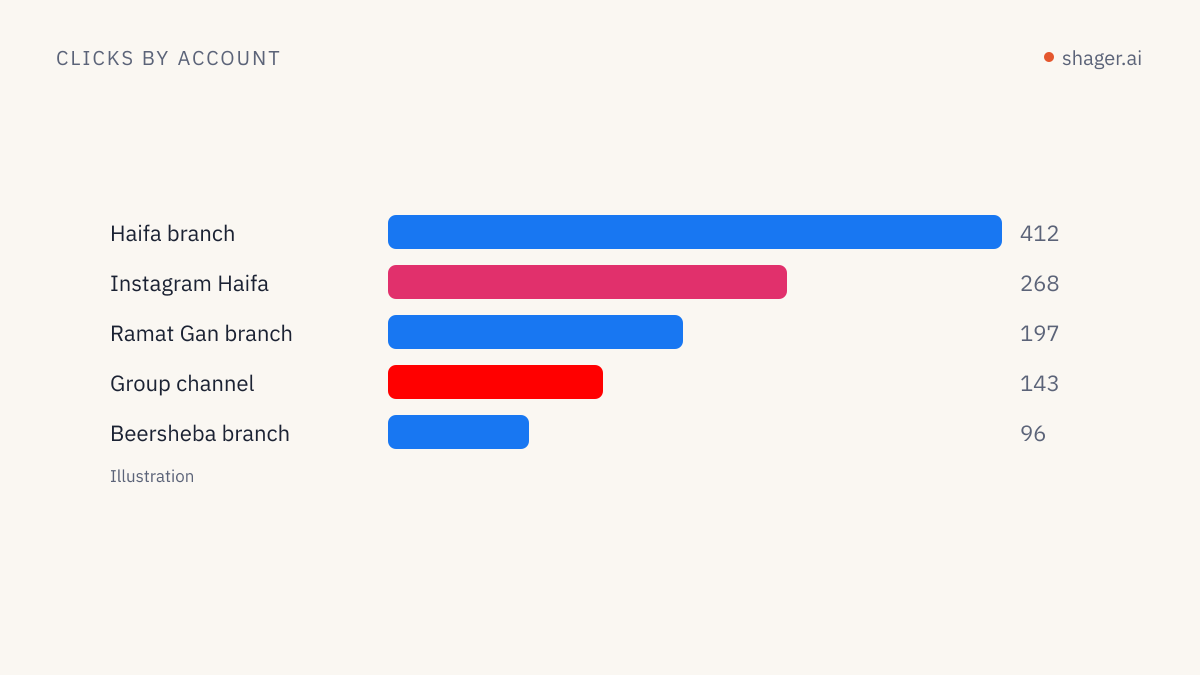
An agent can write a client's weekly distribution report by pulling three things from Shager: the posts published in the week and their per-account outcome, clicks per account and per post from get_analytics, and the list of anything that failed. It then joins those clicks to leads from the client's CRM using the utm_content value that identifies each account. Run it on a schedule with a read-only key, and the report is waiting in a folder on Monday morning.
The part that takes thought is not the code. It is deciding what the client actually needs to see, and being honest about what the numbers measure.
What should a weekly distribution report contain?
Four sections are enough. Anything else belongs in the monthly review.
- Delivery. How many posts went out, to how many accounts, and which accounts failed. Clients rarely ask about this until something goes missing, and then it is the only thing they ask about.
- Clicks by account. Which pages, branches or channels sent people to the site. This is the section that changes budgets.
- Clicks by post. Which content worked, across all accounts.
- Actions. What the client needs to do: reconnect an account, approve next week's drafts, send missing assets.
Notice what is missing: reach, impressions, likes. Shager measures clicks on its own tracked links, per account and per post. It does not claim to be a social analytics suite, and the report should not pretend otherwise.
The data calls
For a client workspace, the agent runs this sequence. The tool names are the real MCP tools; the REST equivalents are in the OpenAPI document.
list_workspacesto resolve the client's workspace by name.list_postswithstatusset toPUBLISHED, then again withPARTIALLY_PUBLISHEDandFAILED.limitgoes up to 100.get_postfor each post from the week, to get per-account state, live URLs and error messages.get_analyticswithfromandtocovering the week.list_channels, to map channel IDs to readable account names and to spot accounts whose connection status has changed.
The analytics call over REST:
curl -s "https://app.shager.ai/api/v1/workspaces/ws_example/analytics?from=2026-09-14T00:00:00%2B03:00&to=2026-09-20T23:59:59%2B03:00" \
  -H "Authorization: Bearer $SHAGER_READ_KEY"
Two details in that URL bite people. The + in the offset must be encoded as %2B in a query string, or the server reads it as a space. And the week boundaries should be computed in the client's time zone, not the server's. If from is omitted, get_analytics defaults to the last 30 days, which is not what a weekly report wants.
Clicks are not leads, so join them
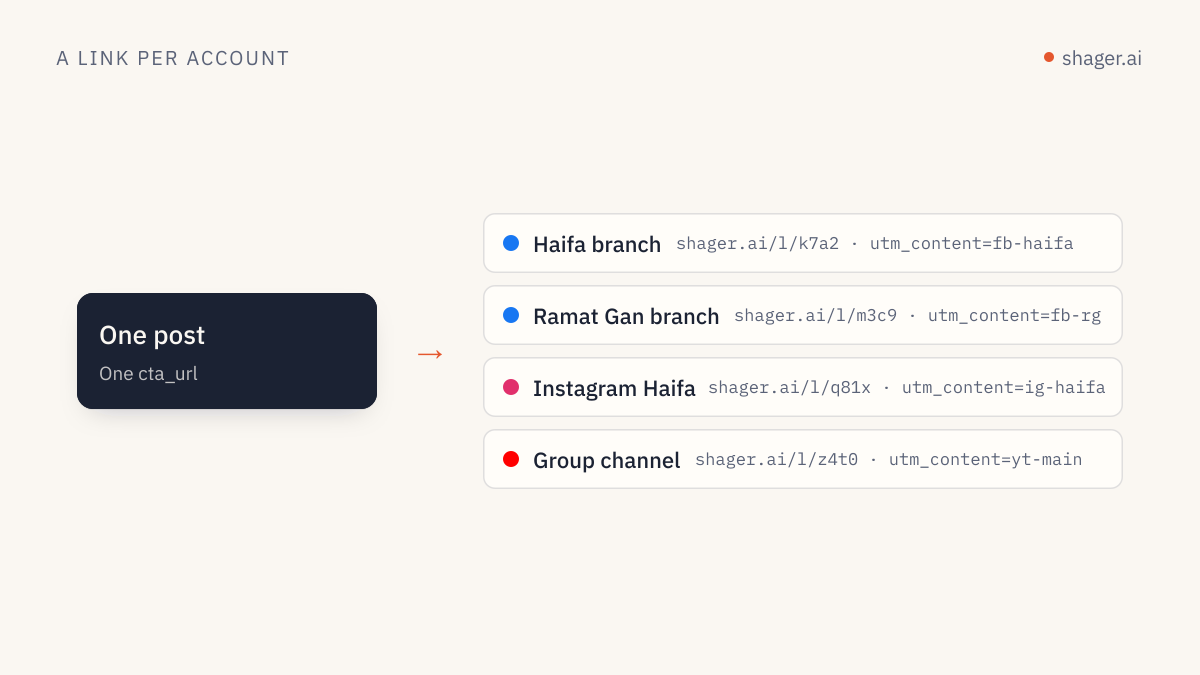
Shager gives every account its own short link and UTM tags, with utm_content identifying the account. That is what makes the join possible. The CRM records leads with the UTM values captured on the landing page form; the agent matches them to Shager's per-account click counts on the same utm_content.
The resulting table is the heart of the report:
| Account | Posts | Clicks (Shager) | Leads (CRM) | Note |
|---|---|---|---|---|
| Aurora Downtown | 4 | ... | ... | |
| Aurora Northside | 4 | ... | ... | reconnect needed |
The gaps between columns are information. Many clicks and no leads is a landing page or offer problem, not a distribution problem. Our older guide on per-account lead attribution covers the form fields and CRM mapping that make the leads column trustworthy, and measuring leads from agent content covers the agent side.
If you do not have CRM access, the report still works with clicks only. Say so in the report header. A report that labels clicks as "results" is how agencies lose trust a quarter later.
Running it unattended with Claude Code
Claude Code can run non-interactively with claude -p, as described in its headless documentation. That makes a weekly report a cron job.
First, a project folder for reports with a .mcp.json that reads the key from the environment. Claude Code's MCP documentation supports ${VAR} expansion in headers:
{
  "mcpServers": {
    "shager": {
      "type": "http",
      "url": "https://app.shager.ai/api/mcp",
      "headers": { "Authorization": "Bearer ${SHAGER_READ_KEY}" }
    }
  }
}
Then the instructions, saved as a skill so the logic lives in one file rather than in a crontab line. Claude Code loads project skills from .claude/skills/<name>/SKILL.md, per its skills documentation:
---
name: weekly-report
description: Compile the weekly distribution report for one client workspace from Shager. Use when asked for a weekly client report.
---

The argument is the client workspace name: $ARGUMENTS

1. Resolve the workspace with list_workspaces. Read its timezone.
2. Compute last Monday 00:00 to Sunday 23:59:59 in that timezone, with offsets.
3. Collect posts with list_posts (PUBLISHED, PARTIALLY_PUBLISHED, FAILED) and
   keep those published in the window. Call get_post for each.
4. Call get_analytics for the window. Map channel ids to names with list_channels.
5. If crm/<workspace>.csv exists, join leads on utm_content.
6. Write reports/<workspace>/<YYYY-MM-DD>.md with four sections: Delivery,
   Clicks by account, Clicks by post, Actions. Use tables. No adjectives about
   performance; numbers and one plain sentence per section.
7. Never call any tool that creates, schedules or cancels anything.
And the scheduled command, which pre-approves only the read tools and file writing:
cd ~/agency-reports && claude -p "/weekly-report Aurora" \
  --allowedTools "mcp__shager__list_*,mcp__shager__get_*,mcp__shager__whoami,Write" \
  --output-format json > logs/aurora-$(date +%F).json
The allow rule syntax with a mcp__<server>__ prefix and a trailing glob is documented in Claude Code's permissions reference. Anything not on that list will not be auto-approved in an unattended run.
Why a read-only key matters here
The skill tells the model not to write. The key makes it impossible. Create a separate key with only the read scope for reporting at the agents dashboard, and use it nowhere else. If that key ever leaks, the worst outcome is someone reading click counts. We go through the full scope model in API keys, scopes and audit.
Every call the reporting agent makes also shows up in the audit log on that dashboard, which is a good way to confirm on the first few Mondays that it calls what you expect and nothing more.
Writing the narrative part
Let the agent write one or two sentences per section, but constrain it. Without rules, models describe a 4 percent change as "a significant increase." My instruction is blunt: state the number, compare it to the previous week if available, and say nothing about cause unless the data shows it. If a branch page had zero clicks because its connection expired on Tuesday, that is a cause the data shows. "Audience fatigue" is not.
FAQ
Can the agent send the report to the client directly?
It can if you give it an email tool, but I would not on day one. Have it write the file, review a few weeks of output, then automate delivery. The report is the client's view of your work, and a wrong number sent automatically costs more than the time saved.
Does get_analytics include leads?
No. It returns clicks on Shager's tracked links, per account and per post, in a date range. Leads come from the client's CRM or form tool, matched on utm_content. The report should keep the two sources visibly separate.
How far back can the report look?
get_analytics accepts any from and to you send, with a default of the last 30 days when from is omitted. For month-over-month comparisons, run the same skill with a different window rather than storing past reports as the source of truth.
Where to go next
If you do not have a key yet, the agent entry point shows how to create one or let an agent sign itself up. Start with one client, read three Mondays of reports yourself, and only then add the rest.