The Agent Content Pipeline, End to End: Brief In, Per-Account Posts Out, Clicks Back, With Every Shager Call in Order
A full agent pipeline on Shager in TypeScript: brief, media, per-account captions, draft, client approval, staggered scheduling, delivery checks and clicks.
9 min read
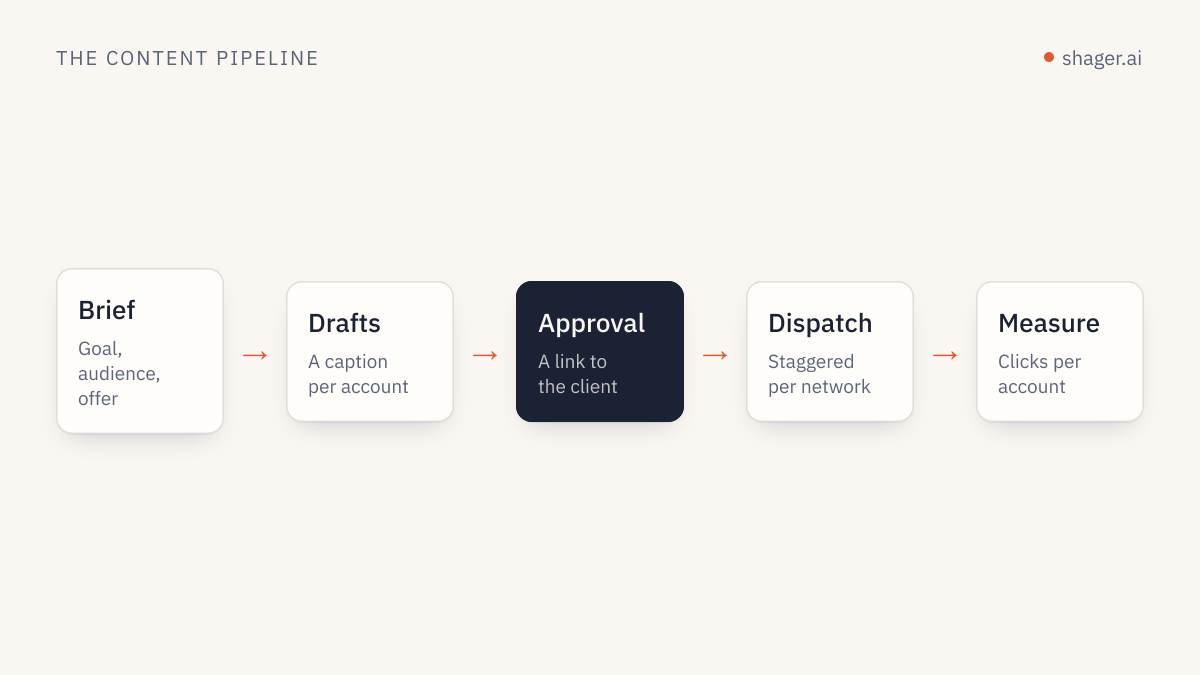
An end-to-end agent content pipeline on Shager has eight stages: read the brief, prepare media at a public URL, resolve the target accounts, write one caption per account, create a draft with a tracked link, get approval, schedule with staggered dispatch, then verify delivery and pull clicks per account. The agent owns the repetitive stages; a human owns the brief and the approval. Every Shager step is one REST call or one MCP tool with the same name.
Below is the whole chain as a single TypeScript program against the REST API, with the reasoning for each stage. If you prefer to drive it from an agent client, the tool calls are identical.
What are the stages, and who owns each?
| Stage | Owner | Shager call |
|---|---|---|
| 1. Brief | Human | None |
| 2. Media | Agent or your asset pipeline | upload_media_from_url |
| 3. Targets | Agent | list_channels, list_groups |
| 4. Captions | Agent (your model) | None |
| 5. Draft | Agent | create_post |
| 6. Approval | Client | request_approval |
| 7. Schedule | Agent with publish, or human |
schedule_post |
| 8. Verify and measure | Agent | get_post, get_analytics |
Stage 4 is the only one that needs a language model. Everything else is deterministic plumbing, and should be written as code rather than left to the model's improvisation. That split is the biggest reliability lesson in agent distribution: let the model write, let code orchestrate.
Stage 1: what goes in the brief?
A brief the pipeline can act on has eight fields. Anything less and the agent starts guessing.
type Brief = {
  workspace: string;          // "Cedar Clinics"
  group: string;              // "All clinics"
  message: string;            // the facts, written by a human
  mediaUrl: string;           // public URL of the finished asset
  media: { width: number; height: number; durationMs?: number };
  link: string;               // landing page to track
  campaign: string;           // "flu-shots-2026"
  publishAt: string;          // "2026-10-27T08:00:00-05:00"
};
publishAt carries an offset on purpose. Shager requires ISO 8601 with an offset for schedule_at, and writing the offset in the brief means nobody has to remember which timezone "8am" meant.
Setup: one helper for every call
const API = "https://app.shager.ai/api/v1";

class ShagerError extends Error {
  constructor(public status: number, public code: string, message: string) {
    super(`${status} ${code}: ${message}`);
  }
}

async function shager<T>(method: string, path: string, body?: unknown): Promise<T> {
  for (let attempt = 0; attempt < 3; attempt++) {
    const res = await fetch(`${API}${path}`, {
      method,
      headers: {
        Authorization: `Bearer ${process.env.SHAGER_API_KEY}`,
        "Content-Type": "application/json",
      },
      body: body ? JSON.stringify(body) : undefined,
    });
    const json = await res.json();
    if (res.ok) return json.data as T;
    if (res.status === 429) {
      await new Promise((r) => setTimeout(r, 60_000));
      continue;
    }
    throw new ShagerError(res.status, json.error.code, json.error.message);
  }
  throw new Error("Rate limited three times in a row");
}
Only 429 is retried. A 403 or 422 is information, and retrying it just repeats the same refusal. The limit is 120 requests per minute per key, which this pipeline won't approach because one create_post covers every account.
Stage 2: media
Shager imports media from a URL, so whatever produced the asset (an editor, a render job, a generation tool) only needs to leave it somewhere publicly reachable.
const workspaces = await shager<Array<{ id: string; name: string }>>("GET", "/workspaces");
const ws = workspaces.find((w) => w.name === brief.workspace);
if (!ws) throw new Error(`No workspace named ${brief.workspace}`);

const media = await shager<{ id: string; kind: string }>("POST", `/workspaces/${ws.id}/media`, {
  url: brief.mediaUrl,
  width: brief.media.width,
  height: brief.media.height,
  duration_ms: brief.media.durationMs,
});
Width, height and duration matter for vertical video. With them, Shager validates Reels, Shorts and Stories against each network's rules before scheduling, so a clip that's too long for a format fails now with a readable reason instead of failing on one network at dispatch time.
Stage 3: resolve targets
type Channel = { id: string; network: string; name: string; status: string; formats: string[] };

const groups = await shager<Array<{ id: string; name: string; channel_ids: string[] }>>(
  "GET", `/workspaces/${ws.id}/groups`,
);
const group = groups.find((g) => g.name === brief.group);
if (!group) throw new Error(`No group named ${brief.group}`);

const channels = (await shager<Channel[]>("GET", `/workspaces/${ws.id}/channels`))
  .filter((c) => group.channel_ids.includes(c.id) && c.status === "ACTIVE");
Filtering to ACTIVE here lets you report disconnected accounts up front. A page whose token expired is a conversation with the client, not something to discover after the post fails.
Stage 4: one caption per account
This is where your model earns its place. The function below is deliberately a stub; plug in whichever model and SDK your team uses.
async function writeCaptions(brief: Brief, channels: Channel[]): Promise<Map<string, string>> {
  // Prompt your model with: the brief's facts, each channel's name and network,
  // and these rules: keep facts identical, vary the opening and structure,
  // use the local detail in the channel name, no raw URLs, network-appropriate length.
  // Return channel_id -> caption, and validate that every channel got one.
  throw new Error("connect your model here");
}

const captions = await writeCaptions(brief, channels);
Two rules belong in that prompt every time. Same facts everywhere, because a price or date that drifts between pages is a real error. And no raw links, because the link is attached separately so each account gets its own tracked version. Our guide on brand consistency across many accounts covers where variation helps and where it hurts.
Stage 5: create the draft
type PostView = {
  id: string;
  status: string;
  destinations: Array<{ channel_id: string; account: string; network: string; format: string; state: string; url: string | null; error: string | null }>;
};

const draft = await shager<PostView>("POST", `/workspaces/${ws.id}/posts`, {
  label: `${brief.campaign} ${brief.publishAt.slice(0, 10)}`,
  caption: brief.message,
  channel_ids: channels.map((c) => c.id),
  media_ids: [media.id],
  per_channel: channels.map((c) => ({ channel_id: c.id, caption: captions.get(c.id)! })),
  cta_url: brief.link,
  campaign: brief.campaign,
  first_comment: `Details: ${brief.link}`,
  stagger_seconds: [30, 90],
});
cta_url gives every account its own short link with utm_content identifying the account. first_comment is posted right after each post goes live. stagger_seconds spaces accounts on the same network by a random 30 to 90 seconds, which is also the default. The result is a DRAFT.
Stage 6: approval
const approval = await shager<{ approval_url: string; emailed: boolean }>(
  "POST", `/workspaces/${ws.id}/posts/${draft.id}/approval`,
  { reviewer_name: "Priya Shah", reviewer_email: "priya@cedarclinics.example", send_email: true },
);
console.log("Approval link:", approval.approval_url);
The reviewer opens the link and approves without logging in. The pipeline stops here and resumes later; approval takes hours, not milliseconds. Persist draft.id and pick it up in a second run that checks get_post for APPROVED. If you want to know why this checkpoint sits after drafting and not after publishing, client approval workflows makes the case.
Stage 7: schedule
const post = await shager<PostView>("GET", `/workspaces/${ws.id}/posts/${draft.id}`);
if (post.status !== "APPROVED") {
  console.log(`Not approved yet: ${post.status}`);
} else {
  try {
    await shager<PostView>("POST", `/workspaces/${ws.id}/posts/${draft.id}/schedule`, {
      schedule_at: brief.publishAt,
    });
  } catch (e) {
    if (e instanceof ShagerError && e.code === "rejected") {
      console.error("A network rule failed:", e.message); // fix input, do not loop
    } else throw e;
  }
}
This needs a key with the publish scope, granted by a human at https://app.shager.ai/dashboard/agents. Shager validates every destination against its network's rules here, so a 422 rejected arrives before anything is queued.
Stage 8: verify delivery and measure
After the publish time, check each destination. Delivery states are PENDING, QUEUED, PROCESSING, PUBLISHED, FAILED and SKIPPED.
const after = await shager<PostView>("GET", `/workspaces/${ws.id}/posts/${draft.id}`);
for (const d of after.destinations) {
  if (d.state === "FAILED" || d.state === "SKIPPED") console.warn(d.account, d.state, d.error);
}

const stats = await shager<{ total_clicks: number; by_account: Array<{ account: string; network: string; clicks: number }> }>(
  "GET", `/workspaces/${ws.id}/analytics?from=2026-10-27T00:00:00-05:00&to=2026-11-03T00:00:00-05:00`,
);
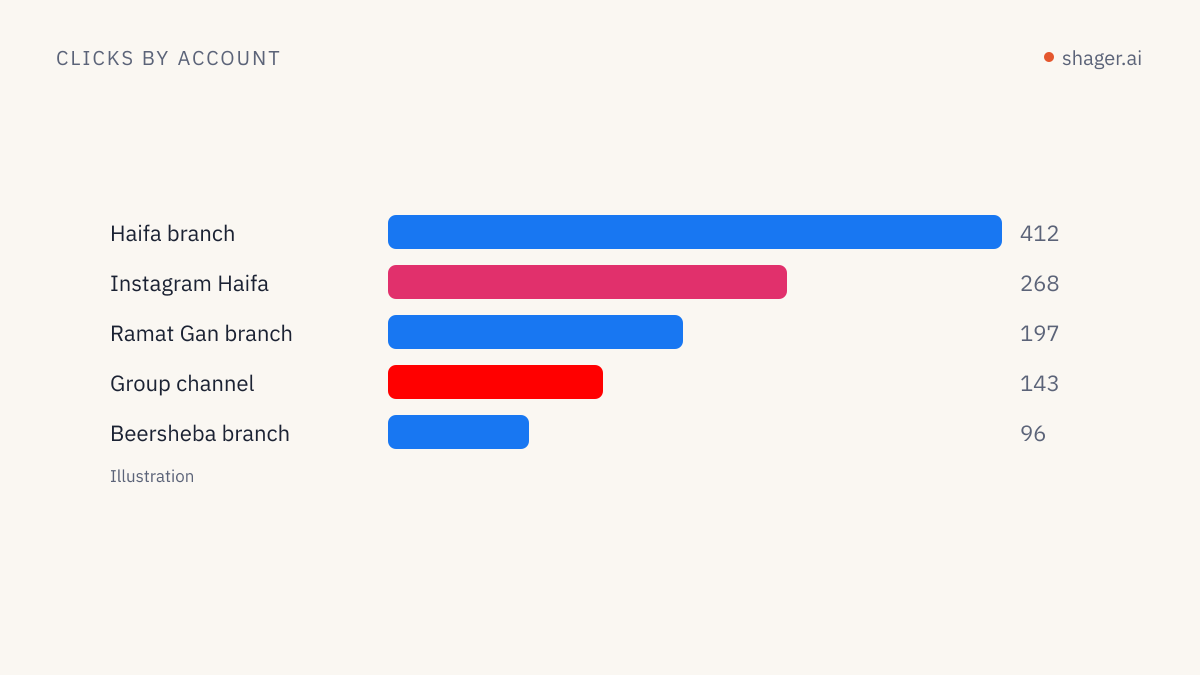
console.table(stats.by_account);
Clicks per account are the end of Shager's part and the start of the client's. Joining them to leads through utm_content in the CRM is covered in per-account lead attribution.
FAQ
Should an agent client run this, or a script?
Both work. A script is better for the fixed stages and anything on a timer. An agent client such as Claude Code is better when the brief is fuzzy and you want to iterate on captions interactively. Many teams use the agent for stage 4 and code for everything else.
What if the brief targets accounts across several clients?
Run the pipeline once per workspace. Workspaces separate clients deliberately: their accounts, approvals, links and analytics never mix, which is also what the client expects when they read their report.
Where do I find the exact field definitions?
In the OpenAPI document, which lists every operation, input and scope. The agents page has the same information in a shorter form for agents and their builders.
Next step
Run the pipeline once with a single test account and a draft you never schedule. Read the draft in Shager, check the per-account links, then widen to the full group. Once that holds, wrap the stages in a weekly routine so the pipeline runs on a schedule instead of on someone's memory.