First-Comment Lead Links With Agents: One Tracked Link per Account, Posted Right After the Post
How an agent uses Shager's first comment and per-account tracked links for leads: where links work on each network, which fields to set and how to measure it.
7 min read
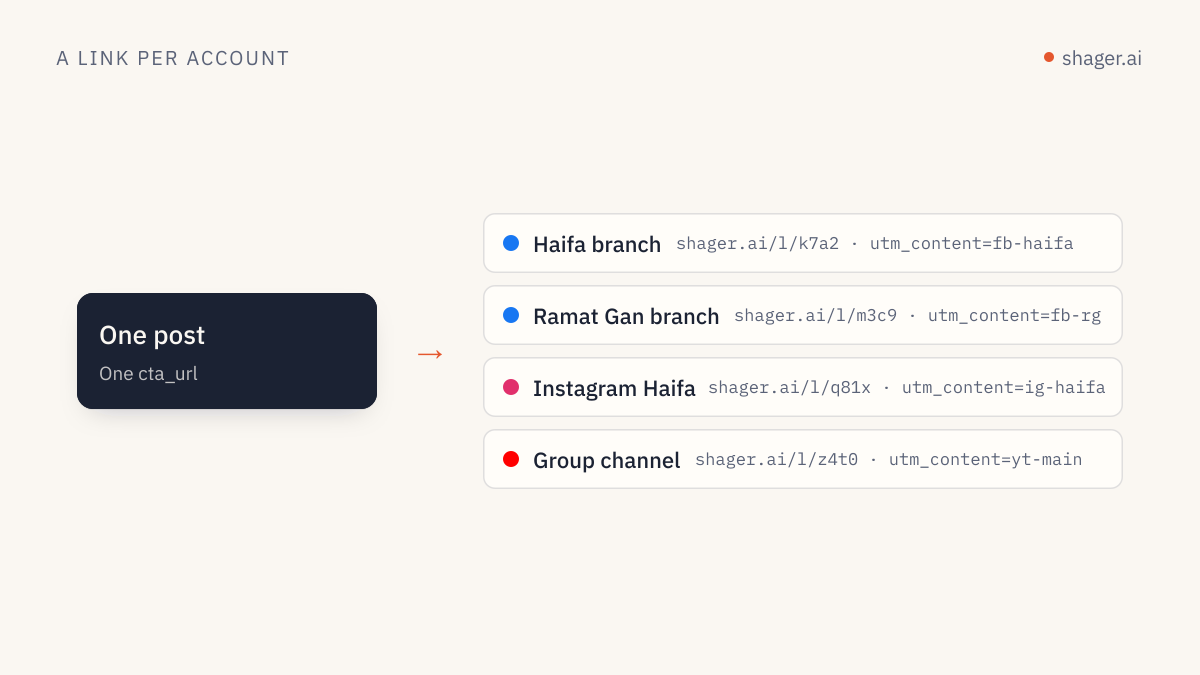
To run first-comment lead links with an agent, set first_comment on the post (or per account in per_channel) and include the landing page URL in it. Shager publishes the post, adds the comment right after it as the account, and replaces every URL in the caption and comment with a short link unique to that account, tagged with UTM parameters where utm_content identifies the account. The agent's job is to write a comment worth clicking and to know where links actually work.
That last part decides whether the whole exercise produces leads or decorative text.
Where does a link in a comment actually work?
The networks treat links differently, and an agent applying one rule everywhere wastes half its effort.
| Network | Link in caption | Link in first comment |
|---|---|---|
| Facebook Pages | Clickable | Clickable |
| Not clickable | Not clickable | |
| YouTube long-form video | Clickable in the description | Clickable |
| YouTube Shorts | Not clickable | Not clickable |
For Shorts, Google's help center states plainly that URLs in Shorts comments and Shorts descriptions are non-clickable, as a measure against spam and scams. Instagram does not turn URLs in captions or comments into links either, which is why bio links and Story link stickers exist.
So the first comment is a lead tool mainly on Facebook Pages and long-form YouTube. On Instagram and Shorts it can still carry a short, typeable address or a "link in bio" pointer, but do not count on clicks from it.
On Facebook, a comment by the Page on its own post is a standard Graph API operation: Meta's Pages API documents creating comments with a POST to the object's comments edge, and the comment's author is the Page. That is what Shager does on your behalf after each account's post goes live, so the agent never needs to time a second call.
The fields the agent sets
Four fields in create_post do the work.
first_comment: the post-wide comment, used for every account that does not have its own.per_channel[].first_comment: a comment for one specific account. It overrides the post-wide one for that account.cta_urlandcta_text: the link to track, with an optional call to action. If the URL is not already in the caption or the comment, Shager places it for you: appended to the caption on networks where caption links work, and moved into the first comment on Instagram if no comment was set.campaign: becomesutm_campaignon every tracked link in the post.
The key behaviour: every URL found in the caption or the first comment is swapped for a tracked short link specific to that account. Forty Pages, forty different short links, all pointing to the same landing page with UTM tags that say which Page sent the visitor. Nobody builds these by hand. The UTM convention behind this is covered in per-account lead attribution.
A worked example
A clinic chain with 24 Facebook Pages and 6 Instagram accounts runs an open day. The agent drafts one post with a per-account caption and a first comment that is also varied, because thirty identical comments are as conspicuous as thirty identical captions.
{
  "tool": "create_post",
  "arguments": {
    "workspace_id": "ws_example",
    "group_ids": ["grp_clinics_all"],
    "caption": "Open day on Friday: free check-ups, no appointment needed.",
    "media_ids": ["med_openday"],
    "cta_url": "https://beacon-dental.example/open-day",
    "campaign": "open-day-oct",
    "first_comment": "Register for a time slot here: https://beacon-dental.example/open-day",
    "per_channel": [
      { "channel_id": "ch_fb_riverside",
        "caption": "Riverside clinic opens its doors on Friday. Free check-ups all day.",
        "first_comment": "Pick a slot at Riverside before they go: https://beacon-dental.example/open-day" },
      { "channel_id": "ch_ig_riverside",
        "caption": "Friday at Riverside: free check-ups, no appointment. Link in our bio.",
        "first_comment": "Slots are limited. The registration link is in our bio." }
    ],
    "label": "Open day Oct, all clinics"
  }
}
A few choices in that payload are deliberate. The Instagram caption points to the bio, because that is where the click can happen. Its own first_comment replaces the post-wide one, so Instagram followers get a pointer to the bio instead of a URL they cannot tap. And the Facebook comment names the branch, which reads like a person wrote it.
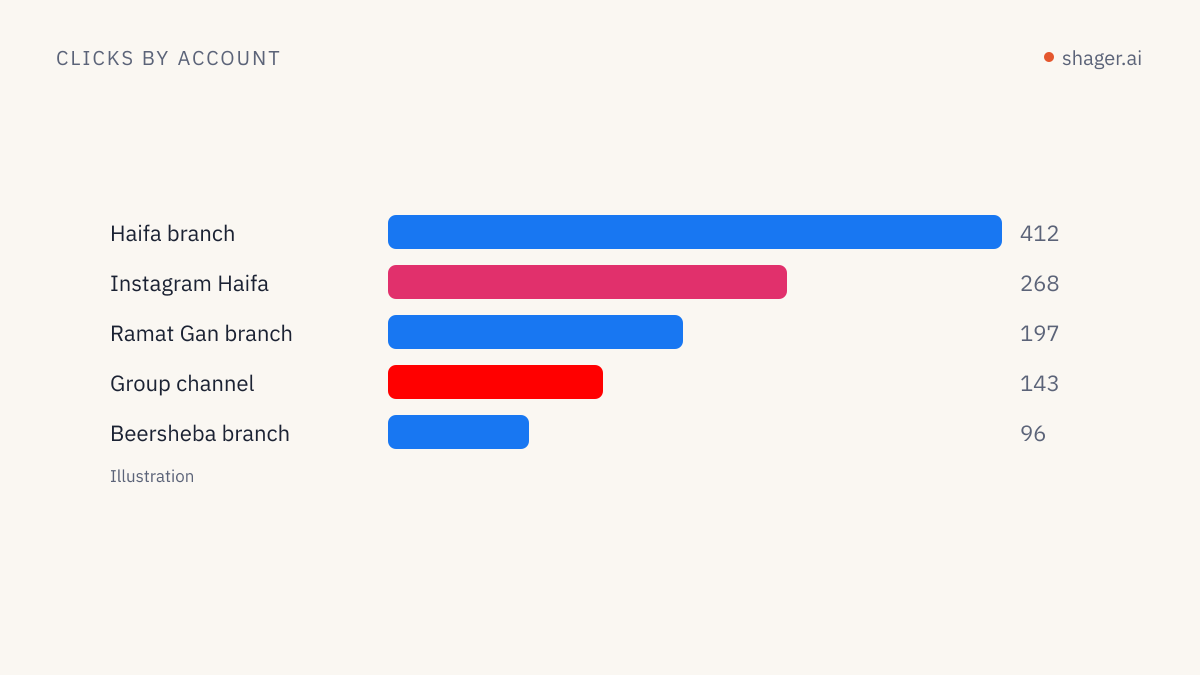
After publishing, the agent checks the run with get_post and, a few days later, reads clicks with get_analytics for the post's date range. Clicks come back per account and per post, so you can see that Riverside's comment link drew clicks and another branch's did not.
Writing comments people click
The agent will write whatever you ask for, so ask for the right thing.
- One link, one action. "Register for a slot" beats "Learn more, register, or call us."
- Specific to the account. Mention the branch, the city, the team. It is also the cheapest form of per-account variation.
- No repetition of the caption. The comment answers "what do I do now?", not "what is this?".
- Short. On mobile, a long comment is collapsed and the link may be below the fold.
Put these into the standing instructions; a ready-made block is in prompts for a content agent.
Does a link in the first comment get more reach than a link in the caption?
No network has published an official statement saying it does. The idea is widespread, and some pages are convinced by their own experience, but treat it as a hypothesis for your audience, not a rule.
Agents make the test cheap. Split the client's accounts into two groups with create_group. Send the same content to both, with the link in the caption for one group and in the first comment for the other. Give each post its own label and a campaign value that marks the variant. After a few rounds, compare clicks per account from get_analytics, and leads from the CRM matched on utm_content. Then keep whichever works, for that client.
Doing it over REST
From a script, the same post is a single call:
curl -s https://app.shager.ai/api/v1/workspaces/ws_example/posts \
  -H "Authorization: Bearer $SHAGER_API_KEY" \
  -H "Content-Type: application/json" \
  -d @open-day-post.json
And the click data afterwards:
curl -s "https://app.shager.ai/api/v1/workspaces/ws_example/analytics?from=2026-10-01T00:00:00Z&to=2026-10-08T00:00:00Z" \
  -H "Authorization: Bearer $SHAGER_API_KEY"
Every operation and field is documented in the OpenAPI document.
From click to lead
Clicks prove interest. Leads prove value. The landing page form should capture the UTM values into hidden fields so each lead in the CRM carries utm_content, the account identifier. With that in place, the agent's weekly report can show leads per Page, not just clicks. Measuring leads from agent content covers that join end to end.
FAQ
Can the first comment be different for every account?
Yes. Set first_comment inside each per_channel entry. Accounts without their own comment use the post-wide first_comment, so set one per account wherever the wording should change.
Does the agent need to create the short links?
No. Shager replaces every URL in the caption and first comment with a tracked short link unique to that account, with UTM tags, at publish time. The agent writes the plain landing page URL.
What if the network does not support a first comment?
Shager checks each post against each network's rules before sending, and a network without first comment support is flagged at that stage rather than failing silently. Facebook, Instagram and YouTube, the networks live today, all accept a first comment.
Where to go next
Pick one client with Facebook Pages, add a first comment with the landing page URL to next week's posts, and read clicks per account after seven days. The agent entry point has the connection details if your agent is not set up yet.