クライアントのアカウントを安心して任せられる、コンテンツエージェント用プロンプト6選
Shager で動くAIコンテンツエージェント用のコピペで使えるプロンプト集。常設ルール、週次の下書き、キャプションの書き分け、予約、レビュー、エラー対応。

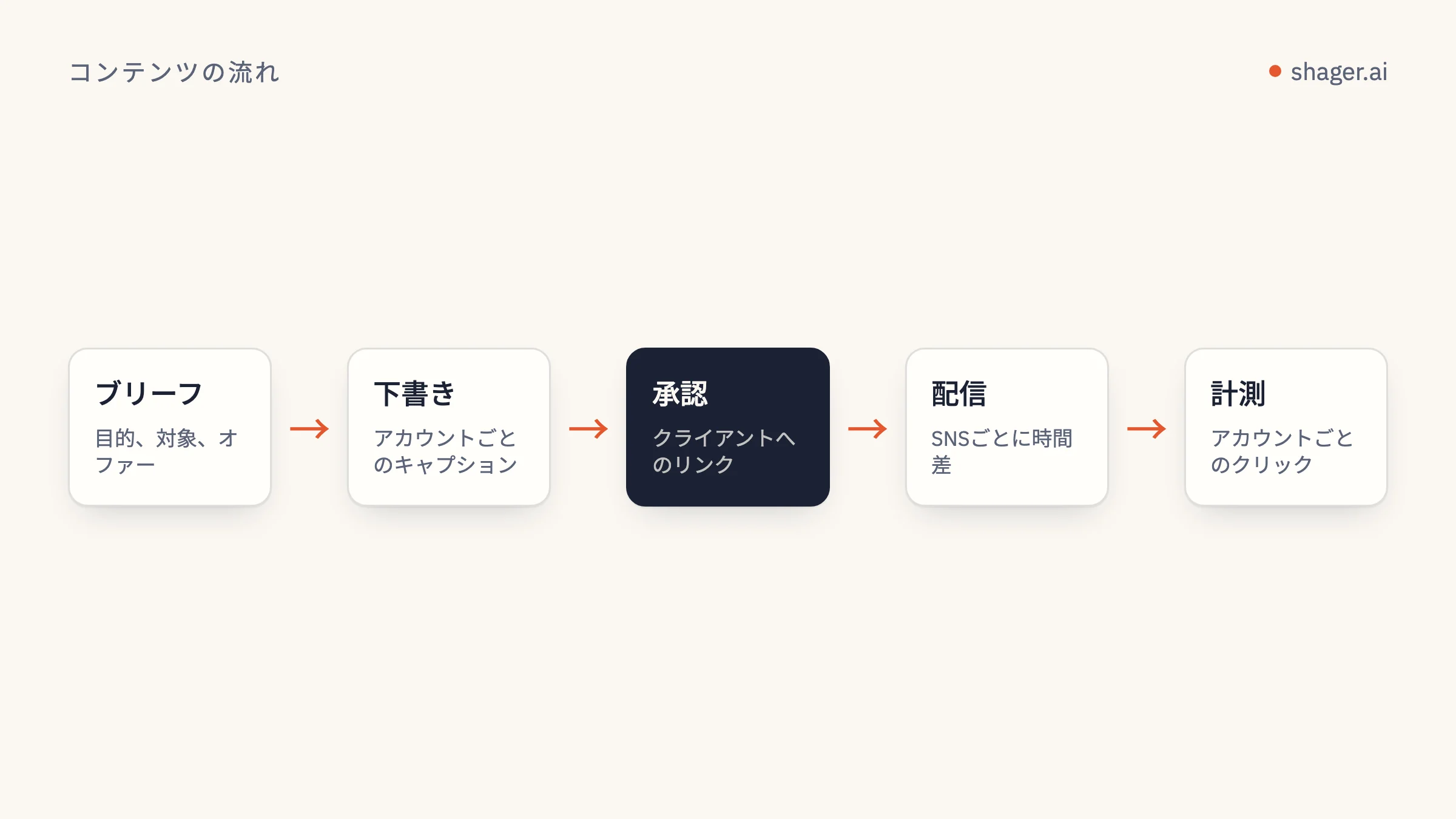
コンテンツエージェントにとって大事なプロンプトは、気の利いた一文ではありません。絶対に守るルールを一度だけ定める常設の指示ブロックと、それぞれが1つの仕事だけをこなす少数のタスク用プロンプトです。週の下書き作成、キャプションの書き分け、予約、公開前のレビュー、そしてエラー対応。ここでは、MCP で Shager に接続したエージェント向けに、そのまま貼り付けて使える完全版を6つ紹介します。
Claude Code と Claude Desktop 向けに書いていますが、ツール名はクライアントではなく MCP サーバーから来るので、少し手を加えれば Codex や Cursor でも動くはずです。
プロンプトの組み立て方
効いているのは主に2つのテクニックです。Anthropic のプロンプトのベストプラクティスでは、指示、コンテキスト、入力を XML タグで分けて、クライアントのブリーフを指示と取り違えないようにすること、そして具体例で形式やトーンを固めることが推奨されています。以下ではどちらも使っています。
もう1つは私自身の原則で、すべてのプロンプトに、呼び出してよい Shager のツールを正確に書くことです。「これを公開して」と言われたエージェントは、何らかの方法で公開してしまいます。「schedule_at を付けずに create_post を呼び出し、そこで止まること」と言われたエージェントは、その通りにします。
山かっこ(< >)で囲んだ部分は、使う前に置き換えてください。
プロンプト1:常設の指示
これはエージェントが常に参照するコンテキストに入れます。Claude Code なら CLAUDE.md ファイル、Claude Desktop ならプロジェクトの指示、Codex なら AGENTS.md ファイルです。Anthropic のメモリに関するドキュメントによると、短く具体的な指示ほど安定して守られるので、本当に必要なルールだけを残しましょう。ここにある各ルールは、誰も止めなければエージェントがやりがちなミスに対応しています。読み込まれるのはセッションごとに一度で、タスクのたびにルールを繰り返す手間が省けます。
You are the content distribution agent for <AGENCY NAME>. You work through the
Shager MCP server. Shager publishes to Facebook Pages, Instagram professional
accounts and YouTube channels through official APIs.

<hard_rules>
1. Never publish or schedule unless the task explicitly says "schedule". Default
   to drafts: call create_post WITHOUT schedule_at.
2. Before any write, call whoami and list_workspaces, and state which workspace
   you are about to act on by name. If the task does not name a client, ask.
3. Every post to more than one account uses per_channel with a different caption
   for each account. Never send identical captions to multiple accounts.
4. Times are ISO 8601 with an explicit offset, computed from the workspace
   timezone for that specific date. Never guess an offset.
5. Never shorten stagger_seconds below the default [30, 90].
6. Do not invent facts about the client: prices, opening hours, offers, dates.
   If the brief does not contain it, leave it out or ask.
7. If any tool returns an error, stop and report the error code and message.
   Do not retry more than once.
</hard_rules>

<house_style>
1. Short sentences. No hashtags unless the brief asks for them.
2. Facebook first comments may carry the link. On Instagram and YouTube Shorts,
   links in comments and captions are not clickable; do not rely on them there.
3. Write in the language of the account, not the language of the brief.
</house_style>

<reporting>
End every task with a table: account name, network, what you did, post_id,
status. Then one line: what a human needs to do next, if anything.
</reporting>
プロンプト2:ブリーフから1週間分を下書きする
これが主力のプロンプトです。ブリーフは専用のタグに入れて、モデルが命令ではなく素材として扱うようにします。
Draft next week's posts for the client workspace "<CLIENT WORKSPACE NAME>".

<brief>
<PASTE THE CLIENT BRIEF, OFFERS, DATES AND ASSETS HERE>
</brief>

<steps>
1. Call list_channels and list_groups for this workspace. Summarise the accounts
   by network and group before drafting.
2. For each media URL in the brief, call upload_media_from_url. For video, pass
   width, height and duration_ms; if you do not know them, ask me.
3. Plan <NUMBER> posts for the week. Show me the plan as a table (day, topic,
   format, target group) and wait for "go".
4. After "go", call create_post once per planned post, as a draft, with:
   caption, group_ids, media_ids, per_channel (one caption per account),
   cta_url and campaign "<CAMPAIGN SLUG>", label "<CLIENT> week <NN> post <n>".
5. Do not call schedule_post or request_approval.
</steps>

Report using the reporting table from your standing instructions.
ステップ3の「go を待つ」という一行のコストはメッセージ1通分だけですが、まずい計画が40件の下書きになる前に、ほとんどを食い止めてくれます。
プロンプト3:アカウントごとにキャプションを書き分ける
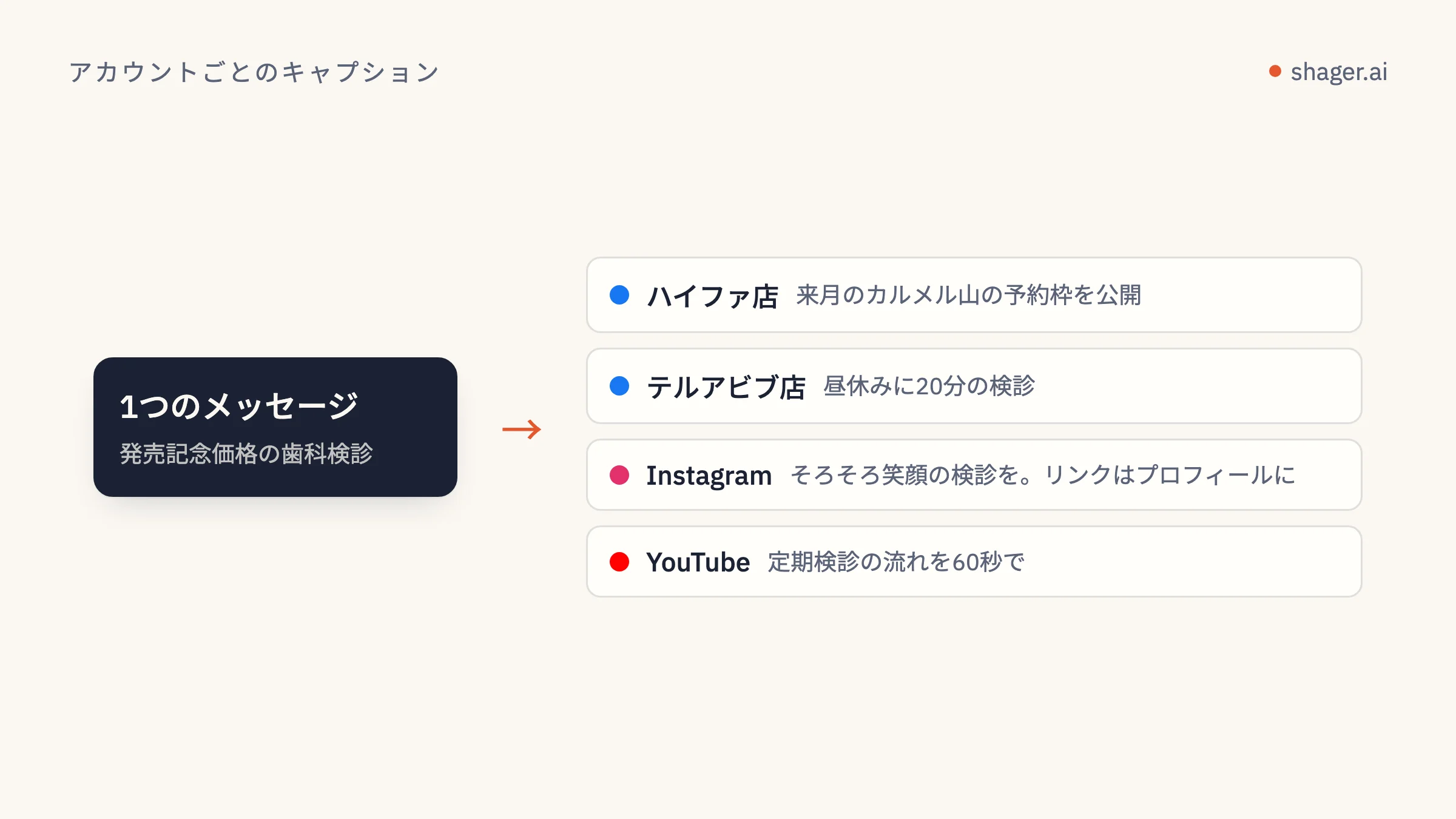
承認済みの1本のマスターキャプションを、多数のバリエーションに展開するときに使います。形容詞で指示するより例を見せたほうがトーンをうまく導けるので、例を入れています。
Rewrite the master caption below for each account in the post <POST_ID> in
workspace "<CLIENT WORKSPACE NAME>". Call get_post to read the accounts.

<master_caption>
<PASTE MASTER CAPTION>
</master_caption>

<rules>
1. Keep every fact, offer and date exactly as in the master. Change wording,
   order and the opening line.
2. Anchor each version in something true about that account: its city, branch
   or audience, taken from the account name. Do not invent local details.
3. Same length as the master, within 20 percent.
4. No two versions may share the same first sentence.
</rules>

<examples>
<example>
Master: "Our winter menu starts Sunday."
Account "Cafe Lune Haifa": "Haifa, the soup is back. Winter menu from Sunday."
Account "Cafe Lune Eilat": "Yes, even in Eilat. The winter menu lands Sunday."
</example>
</examples>

Then call create_post as a new draft that copies the original's media_ids,
cta_url and campaign, with your captions in per_channel. Do not edit or cancel
the original. Report the new post_id.
このプロンプトの背景にある考え方は、AIでアカウントごとにキャプションを書き分けるで詳しく解説しています。
プロンプト4:承認済みの下書きを予約する
時刻に手を触れるのはこのプロンプトだけです。キーに publish スコープがある場合にしか動かず、そのスコープを付与するのは人です。これは意図した設計です。
Schedule the approved drafts in workspace "<CLIENT WORKSPACE NAME>".

<steps>
1. Call list_posts with status APPROVED. Show me the list.
2. Read the workspace timezone. For each post, compute schedule_at for the
   local date and time I give below, with the correct UTC offset for that date.
3. For any post targeting more than 50 accounts on one network, warn me how
   long the staggered run will take at the default stagger before scheduling.
4. Call schedule_post for each. If one fails, stop and show the error.
</steps>

<times>
<POST LABEL OR ID> : <YYYY-MM-DD HH:MM local>
</times>
時刻に関するルールの理由は、エージェントのための予約戦略で説明しています。
プロンプト5:公開前のレビュー
これは別工程として、できれば新しいセッションで実行してください。そうすれば、レビュー担当は自分が書いたばかりの下書きをチェックすることになりません。
You are reviewing drafts, not writing them. Do not create, edit, schedule or
cancel anything. Only call list_posts and get_post.

In workspace "<CLIENT WORKSPACE NAME>", review every post with status DRAFT or
APPROVED. For each, check:
1. Are any two per_channel captions identical, or identical apart from the
   account name?
2. Does any caption contain a fact not present in this brief?
   <brief><PASTE BRIEF></brief>
3. Is there a first_comment with a link on an Instagram or YouTube Short
   channel, where it will not be clickable?
4. Is a REEL or SHORT format set on media that is not vertical video?

Output one table: post label, account, issue, suggested fix. If there are no
issues, say so in one line.
書き込みができないレビュー担当は、作れる安全装置の中で最も安上がりです。エージェントの投稿を人が承認するで紹介している人によるチェックとの相性も抜群です。
プロンプト6:エラーの切り分け
大規模な配信では、一部のアカウントで必ず失敗が出ます。問題は、それにどれだけ早く気づけるか、そしてエージェントが事態を悪化させないかです。
Check the result of post <POST_ID> in workspace "<CLIENT WORKSPACE NAME>".

1. Call get_post. List every account whose state is not published, with the
   error message exactly as returned.
2. Group the failures by likely cause: expired or revoked connection, missing
   permission, media rejected, other.
3. For connection problems, do not retry. Tell me which account owner needs a
   new connect link. If I confirm, call create_connect_link with a label naming
   that account.
4. Do not create a replacement post unless I ask.
キーとコンテキストについて
どのプロンプトにも API キーは含まれていませんし、含めるべきでもありません。キーは MCP クライアントの設定か環境変数に置きます。プロンプトに貼り付けると、トランスクリプトやログ、場合によっては共有されたチャット履歴にまで残ってしまいます。
よくある質問
Claude 以外のモデルでも使えますか?
構成そのものは使えます。XML タグと明示的なツール名は、十分な性能のモデルならどれにも効果があります。ただし常設の指示の読み込ませ方は、クライアントごとに専用のファイルや設定があるので、調整が必要になる場合があります。
週次の下書きプロンプトから、そのまま予約までさせないのはなぜですか?
最も高くつくミスは公開の瞬間に起きるからです。プロンプトを分け、スコープも別に付与することで、その瞬間を意図的な操作にできます。下書きなら簡単に取り消せますが、60ページへの投稿はそうはいきません。
常設の指示はどのくらいの長さにすべきですか?
絶対に守るべきルールに必要な分だけで、それ以上は不要です。実際に一度も破られないルールなら、おそらく削っても構いません。同じミスが2回起きたら、それをルールにします。
次のステップ
エージェントをまだ接続していない場合は、エージェント向けページで MCP のアドレスと自己登録の呼び出し方を確認できます。まずは1社のクライアントでプロンプト1と2から始め、量が増えるのに合わせて残りを加えていきましょう。