Sei prompt per affidare a un agente i contenuti dei tuoi clienti senza rischi
Prompt pronti da copiare per un agente IA che lavora con Shager: regole fisse, bozze della settimana, testi per account, programmazione, revisione e errori.

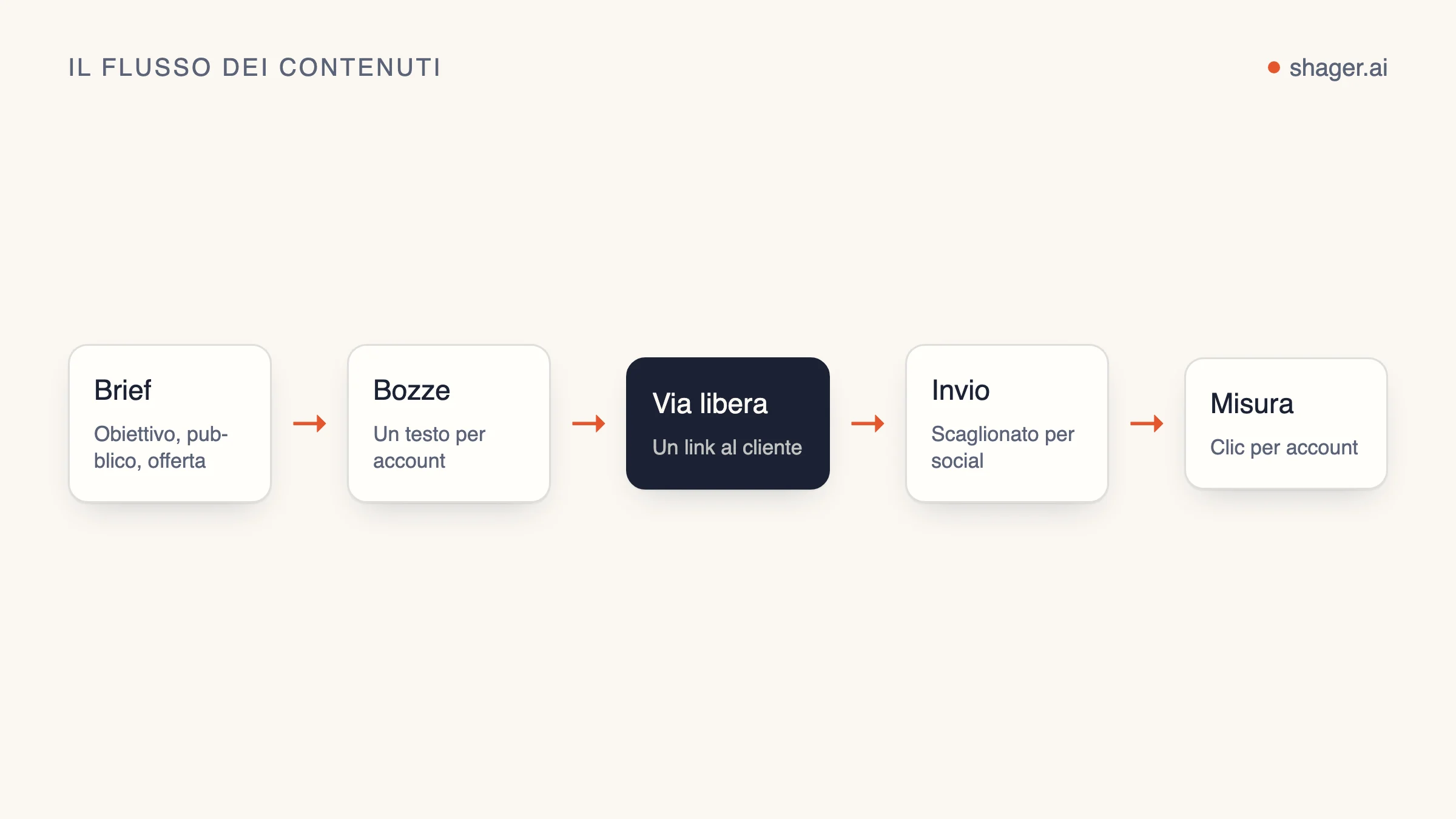
Per un agente che gestisce contenuti, i prompt che contano non sono le battute a effetto. Serve un blocco di istruzioni permanenti che fissa una volta per tutte le regole inderogabili, più qualche prompt operativo che fa una cosa sola: preparare le bozze della settimana, variare i testi, programmare, rivedere tutto prima che esca e capire cosa è andato storto. Qui sotto ne trovi sei, completi e pronti da incollare, pensati per un agente collegato a Shager via MCP.
Sono scritti per Claude Code e Claude Desktop, ma con piccoli ritocchi dovrebbero funzionare anche in Codex o Cursor: i nomi dei tool arrivano dal server MCP, non dal client.
Come sono costruiti questi prompt
Gran parte del lavoro la fanno due tecniche. Le best practice di prompting di Anthropic consigliano di separare istruzioni, contesto e input con tag XML, così il modello non scambia il brief di un cliente per un ordine, e di usare esempi concreti per fissare formato e tono. Le ritroverai entrambe qui sotto.
Il terzo principio è mio: ogni prompt elenca esattamente i tool di Shager che può chiamare. Se dici a un agente "pubblica questo", troverà il modo di farlo. Se gli dici "chiama create_post senza schedule_at, poi fermati", farà esattamente quello.
Prima dell'uso, sostituisci tutto ciò che è tra parentesi angolari.
Prompt 1: istruzioni permanenti
Questo blocco va nel contesto persistente dell'agente: un file CLAUDE.md per Claude Code, le istruzioni di progetto in Claude Desktop, un file AGENTS.md per Codex. La documentazione di Anthropic sulla memoria osserva che le istruzioni brevi e specifiche vengono seguite con più costanza, quindi tieni solo le regole che ti servono davvero. Ognuna di queste corregge un errore che gli agenti commettono quando nessuno dice loro il contrario. Viene letto una volta per sessione e ti evita di ripetere le regole in ogni attività.
You are the content distribution agent for <AGENCY NAME>. You work through the
Shager MCP server. Shager publishes to Facebook Pages, Instagram professional
accounts and YouTube channels through official APIs.

<hard_rules>
1. Never publish or schedule unless the task explicitly says "schedule". Default
   to drafts: call create_post WITHOUT schedule_at.
2. Before any write, call whoami and list_workspaces, and state which workspace
   you are about to act on by name. If the task does not name a client, ask.
3. Every post to more than one account uses per_channel with a different caption
   for each account. Never send identical captions to multiple accounts.
4. Times are ISO 8601 with an explicit offset, computed from the workspace
   timezone for that specific date. Never guess an offset.
5. Never shorten stagger_seconds below the default [30, 90].
6. Do not invent facts about the client: prices, opening hours, offers, dates.
   If the brief does not contain it, leave it out or ask.
7. If any tool returns an error, stop and report the error code and message.
   Do not retry more than once.
</hard_rules>

<house_style>
1. Short sentences. No hashtags unless the brief asks for them.
2. Facebook first comments may carry the link. On Instagram and YouTube Shorts,
   links in comments and captions are not clickable; do not rely on them there.
3. Write in the language of the account, not the language of the brief.
</house_style>

<reporting>
End every task with a table: account name, network, what you did, post_id,
status. Then one line: what a human needs to do next, if anything.
</reporting>
Prompt 2: le bozze della settimana a partire dal brief
È il prompt che lavora di più. Il brief sta dentro un tag tutto suo, così il modello lo tratta come materiale e non come ordini.
Draft next week's posts for the client workspace "<CLIENT WORKSPACE NAME>".

<brief>
<PASTE THE CLIENT BRIEF, OFFERS, DATES AND ASSETS HERE>
</brief>

<steps>
1. Call list_channels and list_groups for this workspace. Summarise the accounts
   by network and group before drafting.
2. For each media URL in the brief, call upload_media_from_url. For video, pass
   width, height and duration_ms; if you do not know them, ask me.
3. Plan <NUMBER> posts for the week. Show me the plan as a table (day, topic,
   format, target group) and wait for "go".
4. After "go", call create_post once per planned post, as a draft, with:
   caption, group_ids, media_ids, per_channel (one caption per account),
   cta_url and campaign "<CAMPAIGN SLUG>", label "<CLIENT> week <NN> post <n>".
5. Do not call schedule_post or request_approval.
</steps>

Report using the reporting table from your standing instructions.
La riga "wait for go" del passaggio 3 costa un messaggio e blocca quasi tutti i piani sbagliati prima che diventino quaranta bozze.
Prompt 3: un testo diverso per ogni account
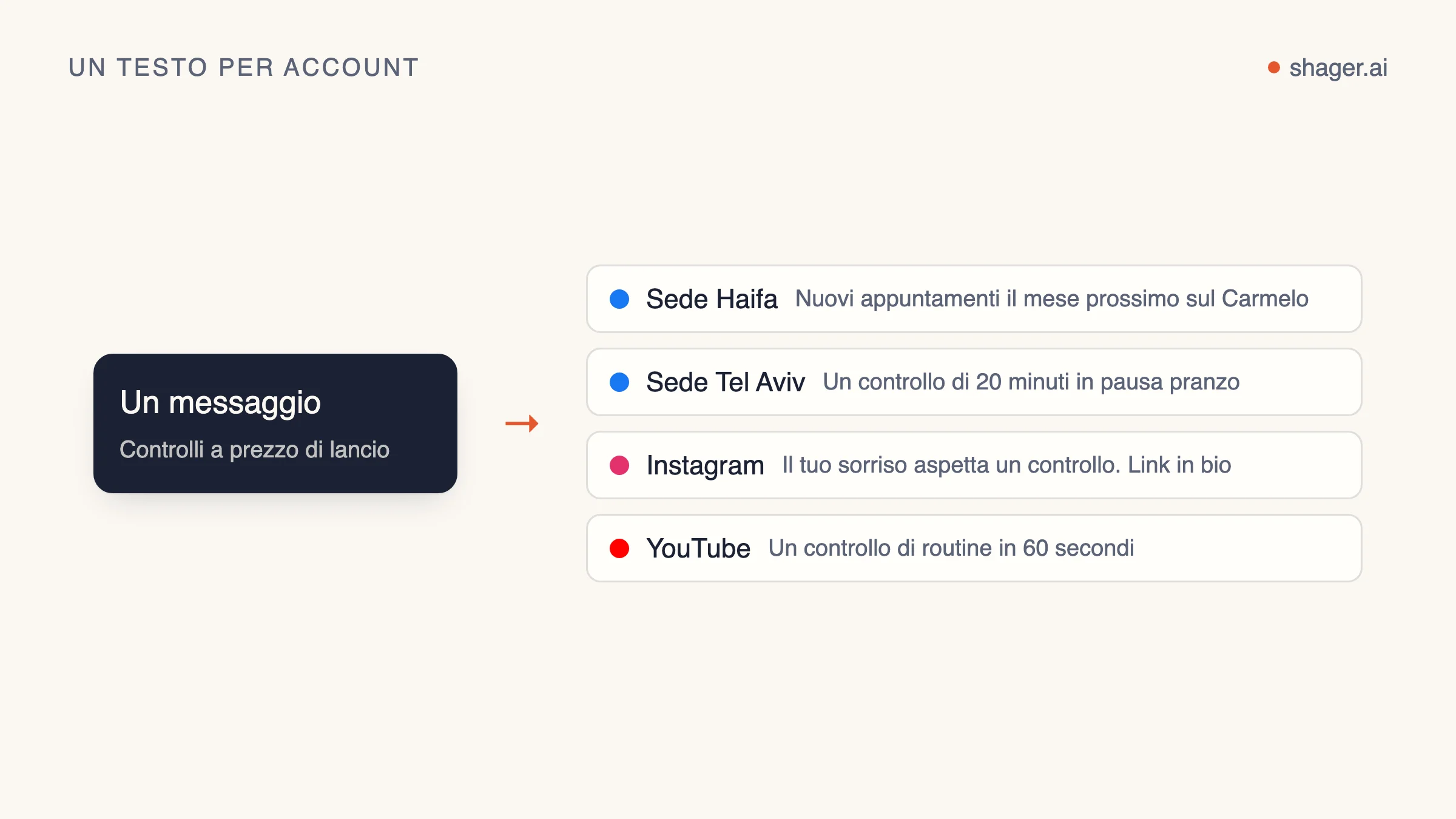
Usalo quando un unico testo master già approvato deve diventare tante versioni. Contiene degli esempi, perché gli esempi orientano il tono meglio di qualsiasi aggettivo.
Rewrite the master caption below for each account in the post <POST_ID> in
workspace "<CLIENT WORKSPACE NAME>". Call get_post to read the accounts.

<master_caption>
<PASTE MASTER CAPTION>
</master_caption>

<rules>
1. Keep every fact, offer and date exactly as in the master. Change wording,
   order and the opening line.
2. Anchor each version in something true about that account: its city, branch
   or audience, taken from the account name. Do not invent local details.
3. Same length as the master, within 20 percent.
4. No two versions may share the same first sentence.
</rules>

<examples>
<example>
Master: "Our winter menu starts Sunday."
Account "Cafe Lune Haifa": "Haifa, the soup is back. Winter menu from Sunday."
Account "Cafe Lune Eilat": "Yes, even in Eilat. The winter menu lands Sunday."
</example>
</examples>

Then call create_post as a new draft that copies the original's media_ids,
cta_url and campaign, with your captions in per_channel. Do not edit or cancel
the original. Report the new post_id.
Il metodo dietro questo prompt è spiegato più a fondo in testi diversi per ogni account con l'IA.
Prompt 4: programmare le bozze approvate
È l'unico prompt che tocca l'orologio. Funziona solo se la chiave ha lo scope publish, che concede una persona. Ed è proprio questo lo scopo.
Schedule the approved drafts in workspace "<CLIENT WORKSPACE NAME>".

<steps>
1. Call list_posts with status APPROVED. Show me the list.
2. Read the workspace timezone. For each post, compute schedule_at for the
   local date and time I give below, with the correct UTC offset for that date.
3. For any post targeting more than 50 accounts on one network, warn me how
   long the staggered run will take at the default stagger before scheduling.
4. Call schedule_post for each. If one fails, stop and show the error.
</steps>

<times>
<POST LABEL OR ID> : <YYYY-MM-DD HH:MM local>
</times>
Il perché delle regole sugli orari è in strategia di programmazione per agenti.
Prompt 5: il controllo prima della pubblicazione
Eseguilo come passaggio separato, meglio ancora in una sessione nuova, così il revisore non è lo stesso che ha appena scritto le bozze da controllare.
You are reviewing drafts, not writing them. Do not create, edit, schedule or
cancel anything. Only call list_posts and get_post.

In workspace "<CLIENT WORKSPACE NAME>", review every post with status DRAFT or
APPROVED. For each, check:
1. Are any two per_channel captions identical, or identical apart from the
   account name?
2. Does any caption contain a fact not present in this brief?
   <brief><PASTE BRIEF></brief>
3. Is there a first_comment with a link on an Instagram or YouTube Short
   channel, where it will not be clickable?
4. Is a REEL or SHORT format set on media that is not vertical video?

Output one table: post label, account, issue, suggested fix. If there are no
issues, say so in one line.
Un revisore che non può scrivere è il livello di sicurezza più economico che costruirai. Si abbina bene al controllo umano descritto in approvazione umana dei post degli agenti.
Prompt 6: capire cosa è andato storto
In una campagna grande, qualche account fallirà. La vera domanda è quanto in fretta lo vieni a sapere e se l'agente peggiora le cose.
Check the result of post <POST_ID> in workspace "<CLIENT WORKSPACE NAME>".

1. Call get_post. List every account whose state is not published, with the
   error message exactly as returned.
2. Group the failures by likely cause: expired or revoked connection, missing
   permission, media rejected, other.
3. For connection problems, do not retry. Tell me which account owner needs a
   new connect link. If I confirm, call create_connect_link with a label naming
   that account.
4. Do not create a replacement post unless I ask.
Due parole su chiavi e contesto
Nessuno di questi prompt contiene una chiave API, e nessuno dovrebbe. La chiave sta nella configurazione del client MCP o in una variabile d'ambiente. Incollarla in un prompt significa ritrovarla nelle trascrizioni, nei log e a volte nella cronologia di chat condivise.
Domande frequenti
Questi prompt funzionano anche con modelli diversi da Claude?
La struttura sì. I tag XML e i nomi espliciti dei tool aiutano qualsiasi modello capace. Potresti dover cambiare il modo in cui carichi le istruzioni permanenti, perché ogni client ha il suo file o la sua impostazione per il contesto persistente.
Perché non lasciare che l'agente programmi direttamente dal prompt delle bozze settimanali?
Perché gli errori più costosi avvengono nel momento della pubblicazione, e un prompt separato, con uno scope concesso a parte, rende quel momento una scelta consapevole. Una bozza si annulla senza fatica. Un post finito su sessanta pagine no.
Quanto devono essere lunghe le istruzioni permanenti?
Quanto serve per le tue regole inderogabili, non di più. Se una regola nella pratica non viene mai violata, probabilmente puoi toglierla. Se un errore si ripete due volte, diventa una regola.
Da dove continuare
Se il tuo agente non è ancora collegato, la pagina per gli agenti mostra l'indirizzo MCP e la chiamata di registrazione autonoma. Parti dai prompt 1 e 2 su un solo cliente e aggiungi gli altri man mano che i volumi crescono.