Enam Prompt Agar Agen Konten Aman Dijalankan di Akun Klien
Prompt siap salin untuk agen konten AI yang bekerja lewat Shager: aturan tetap, draf mingguan, variasi caption, penjadwalan, tinjauan, dan penanganan kegagalan.

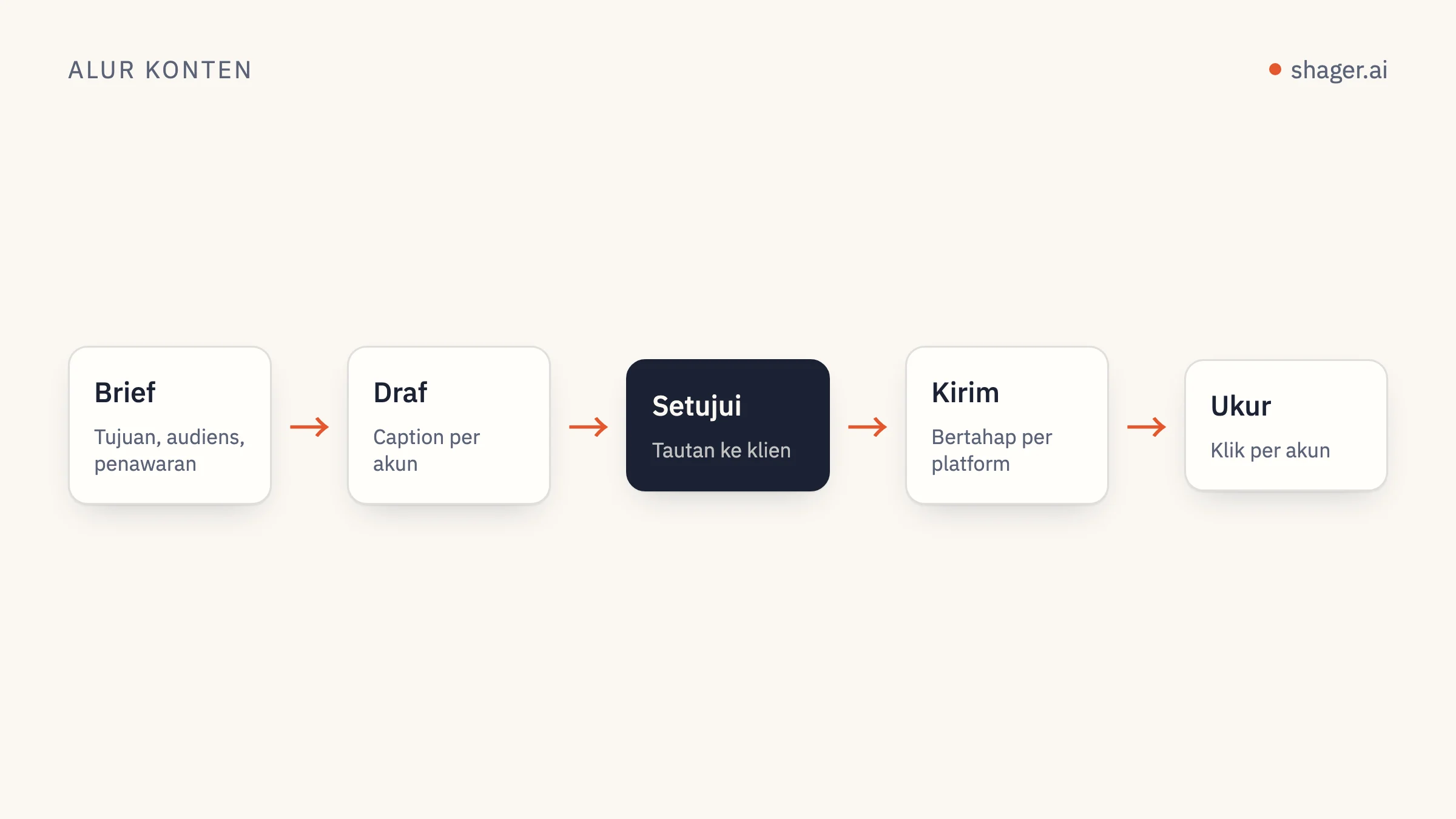
Prompt yang benar-benar penting untuk agen konten bukanlah kalimat pendek yang cerdik. Yang dibutuhkan adalah satu blok instruksi tetap yang menetapkan aturan keras sekali saja, ditambah beberapa prompt tugas yang masing-masing mengerjakan satu hal: menyusun draf seminggu, membuat variasi caption, menjadwalkan, meninjau sebelum apa pun terbit, dan menangani kegagalan. Berikut enam prompt lengkap yang siap ditempel, ditulis untuk agen yang terhubung ke Shager lewat MCP.
Prompt ini ditulis untuk Claude Code dan Claude Desktop, dan seharusnya juga jalan di Codex atau Cursor dengan sedikit penyesuaian, karena nama tool-nya berasal dari server MCP, bukan dari kliennya.
Bagaimana prompt ini disusun
Ada dua teknik yang memikul sebagian besar beban. Praktik terbaik prompting dari Anthropic menyarankan untuk memisahkan instruksi, konteks, dan input dengan tag XML agar model tidak mengira brief klien sebagai perintah, serta memakai contoh konkret untuk mengunci format dan nada. Keduanya muncul di bawah.
Prinsip lainnya datang dari saya sendiri: setiap prompt menyebutkan tool Shager mana saja yang boleh dipanggil. Agen yang disuruh "publikasikan ini" akan mencari caranya sendiri. Agen yang disuruh "panggil create_post tanpa schedule_at, lalu berhenti" akan melakukan persis itu.
Ganti semua yang ada di dalam kurung sudut sebelum dipakai.
Prompt 1: instruksi tetap
Bagian ini masuk ke konteks permanen agen: file CLAUDE.md untuk Claude Code, instruksi proyek di Claude Desktop, file AGENTS.md untuk Codex. Dokumentasi memori Anthropic mencatat bahwa instruksi yang lebih pendek dan spesifik diikuti dengan lebih konsisten, jadi simpan hanya aturan yang benar-benar Anda perlukan. Setiap aturan di sini menjawab kesalahan yang biasa dibuat agen kalau tidak ada yang melarangnya. Blok ini dibaca sekali per sesi, sehingga Anda tidak perlu mengulang aturan di setiap tugas.
You are the content distribution agent for <AGENCY NAME>. You work through the
Shager MCP server. Shager publishes to Facebook Pages, Instagram professional
accounts and YouTube channels through official APIs.

<hard_rules>
1. Never publish or schedule unless the task explicitly says "schedule". Default
   to drafts: call create_post WITHOUT schedule_at.
2. Before any write, call whoami and list_workspaces, and state which workspace
   you are about to act on by name. If the task does not name a client, ask.
3. Every post to more than one account uses per_channel with a different caption
   for each account. Never send identical captions to multiple accounts.
4. Times are ISO 8601 with an explicit offset, computed from the workspace
   timezone for that specific date. Never guess an offset.
5. Never shorten stagger_seconds below the default [30, 90].
6. Do not invent facts about the client: prices, opening hours, offers, dates.
   If the brief does not contain it, leave it out or ask.
7. If any tool returns an error, stop and report the error code and message.
   Do not retry more than once.
</hard_rules>

<house_style>
1. Short sentences. No hashtags unless the brief asks for them.
2. Facebook first comments may carry the link. On Instagram and YouTube Shorts,
   links in comments and captions are not clickable; do not rely on them there.
3. Write in the language of the account, not the language of the brief.
</house_style>

<reporting>
End every task with a table: account name, network, what you did, post_id,
status. Then one line: what a human needs to do next, if anything.
</reporting>
Prompt 2: susun draf seminggu dari brief
Inilah prompt andalan. Brief ditaruh di dalam tag-nya sendiri agar model memperlakukannya sebagai bahan, bukan perintah.
Draft next week's posts for the client workspace "<CLIENT WORKSPACE NAME>".

<brief>
<PASTE THE CLIENT BRIEF, OFFERS, DATES AND ASSETS HERE>
</brief>

<steps>
1. Call list_channels and list_groups for this workspace. Summarise the accounts
   by network and group before drafting.
2. For each media URL in the brief, call upload_media_from_url. For video, pass
   width, height and duration_ms; if you do not know them, ask me.
3. Plan <NUMBER> posts for the week. Show me the plan as a table (day, topic,
   format, target group) and wait for "go".
4. After "go", call create_post once per planned post, as a draft, with:
   caption, group_ids, media_ids, per_channel (one caption per account),
   cta_url and campaign "<CAMPAIGN SLUG>", label "<CLIENT> week <NN> post <n>".
5. Do not call schedule_post or request_approval.
</steps>

Report using the reporting table from your standing instructions.
Baris "wait for go" di langkah 3 hanya menambah satu pesan, tetapi menangkap sebagian besar rencana buruk sebelum berubah menjadi empat puluh draf.
Prompt 3: variasi caption per akun
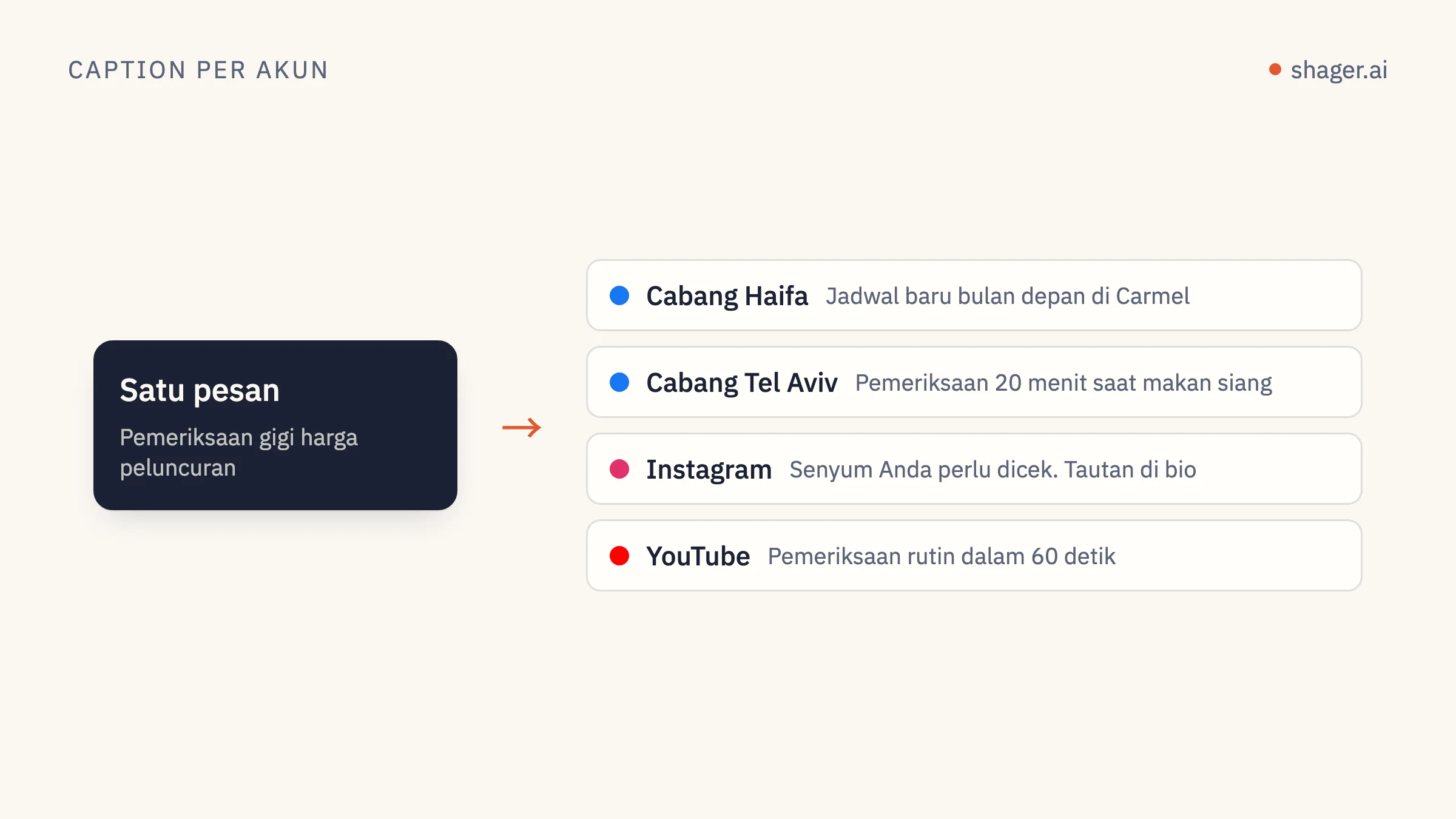
Pakai prompt ini saat satu caption utama yang sudah disetujui perlu dipecah menjadi banyak versi. Prompt ini menyertakan contoh, karena contoh mengarahkan nada lebih baik daripada kata sifat.
Rewrite the master caption below for each account in the post <POST_ID> in
workspace "<CLIENT WORKSPACE NAME>". Call get_post to read the accounts.

<master_caption>
<PASTE MASTER CAPTION>
</master_caption>

<rules>
1. Keep every fact, offer and date exactly as in the master. Change wording,
   order and the opening line.
2. Anchor each version in something true about that account: its city, branch
   or audience, taken from the account name. Do not invent local details.
3. Same length as the master, within 20 percent.
4. No two versions may share the same first sentence.
</rules>

<examples>
<example>
Master: "Our winter menu starts Sunday."
Account "Cafe Lune Haifa": "Haifa, the soup is back. Winter menu from Sunday."
Account "Cafe Lune Eilat": "Yes, even in Eilat. The winter menu lands Sunday."
</example>
</examples>

Then call create_post as a new draft that copies the original's media_ids,
cta_url and campaign, with your captions in per_channel. Do not edit or cancel
the original. Report the new post_id.
Metode di balik prompt ini dibahas lebih dalam di variasi caption per akun dengan AI.
Prompt 4: jadwalkan draf yang sudah disetujui
Ini satu-satunya prompt yang menyentuh jam. Prompt ini hanya berfungsi kalau kuncinya punya cakupan publish, yang diberikan oleh manusia. Memang begitu rancangannya.
Schedule the approved drafts in workspace "<CLIENT WORKSPACE NAME>".

<steps>
1. Call list_posts with status APPROVED. Show me the list.
2. Read the workspace timezone. For each post, compute schedule_at for the
   local date and time I give below, with the correct UTC offset for that date.
3. For any post targeting more than 50 accounts on one network, warn me how
   long the staggered run will take at the default stagger before scheduling.
4. Call schedule_post for each. If one fails, stop and show the error.
</steps>

<times>
<POST LABEL OR ID> : <YYYY-MM-DD HH:MM local>
</times>
Alasan di balik aturan waktu ini ada di strategi penjadwalan untuk agen.
Prompt 5: tinjauan sebelum terbit
Jalankan ini sebagai tahap terpisah, idealnya di sesi baru, supaya peninjaunya bukan agen yang baru saja menulis draf yang sedang diperiksa.
You are reviewing drafts, not writing them. Do not create, edit, schedule or
cancel anything. Only call list_posts and get_post.

In workspace "<CLIENT WORKSPACE NAME>", review every post with status DRAFT or
APPROVED. For each, check:
1. Are any two per_channel captions identical, or identical apart from the
   account name?
2. Does any caption contain a fact not present in this brief?
   <brief><PASTE BRIEF></brief>
3. Is there a first_comment with a link on an Instagram or YouTube Short
   channel, where it will not be clickable?
4. Is a REEL or SHORT format set on media that is not vertical video?

Output one table: post label, account, issue, suggested fix. If there are no
issues, say so in one line.
Peninjau yang tidak bisa menulis adalah lapisan pengaman termurah yang bisa Anda bangun. Ia cocok dipasangkan dengan gerbang manusia yang dijelaskan di persetujuan manusia untuk postingan agen.
Prompt 6: menangani kegagalan
Dalam pengiriman besar, sebagian akun pasti gagal. Pertanyaannya adalah seberapa cepat Anda mengetahuinya dan apakah agen justru memperburuk keadaan.
Check the result of post <POST_ID> in workspace "<CLIENT WORKSPACE NAME>".

1. Call get_post. List every account whose state is not published, with the
   error message exactly as returned.
2. Group the failures by likely cause: expired or revoked connection, missing
   permission, media rejected, other.
3. For connection problems, do not retry. Tell me which account owner needs a
   new connect link. If I confirm, call create_connect_link with a label naming
   that account.
4. Do not create a replacement post unless I ask.
Catatan soal kunci dan konteks
Tidak satu pun prompt ini berisi kunci API, dan memang tidak boleh. Kunci disimpan di konfigurasi klien MCP atau di variabel lingkungan. Menempelkannya ke prompt berarti memasukkannya ke transkrip, log, dan kadang riwayat chat yang dibagikan.
FAQ
Apakah prompt ini bisa dipakai dengan model selain Claude?
Strukturnya bisa. Tag XML dan nama tool yang eksplisit membantu model apa pun yang cukup mumpuni. Anda mungkin perlu menyesuaikan cara memuat instruksi tetap, karena setiap klien punya file atau pengaturan sendiri untuk konteks permanen.
Kenapa agen tidak langsung menjadwalkan dari prompt draf mingguan?
Karena kesalahan paling mahal terjadi pada saat publikasi, dan prompt terpisah dengan cakupan yang diberikan terpisah membuat momen itu menjadi keputusan yang disengaja. Draf murah untuk dibatalkan. Postingan ke enam puluh halaman tidak.
Seberapa panjang instruksi tetap sebaiknya?
Sepanjang yang dibutuhkan aturan keras Anda, tidak lebih. Kalau sebuah aturan tidak pernah dilanggar dalam praktik, mungkin aturan itu bisa dihapus. Kalau sebuah kesalahan terjadi dua kali, jadikan aturan.
Langkah selanjutnya
Kalau agen Anda belum terhubung, titik masuk untuk agen menampilkan alamat MCP dan panggilan pendaftaran mandiri. Mulailah dengan prompt 1 dan 2 untuk satu klien, lalu tambahkan yang lain seiring volume bertambah.