Add Shager to Cursor With .cursor/mcp.json: Turn Release Notes Into Drafts for Every Client Account
Configure Shager's remote MCP server in Cursor with a url and an env-backed Authorization header, then turn a changelog into per-account social drafts.
7 min read
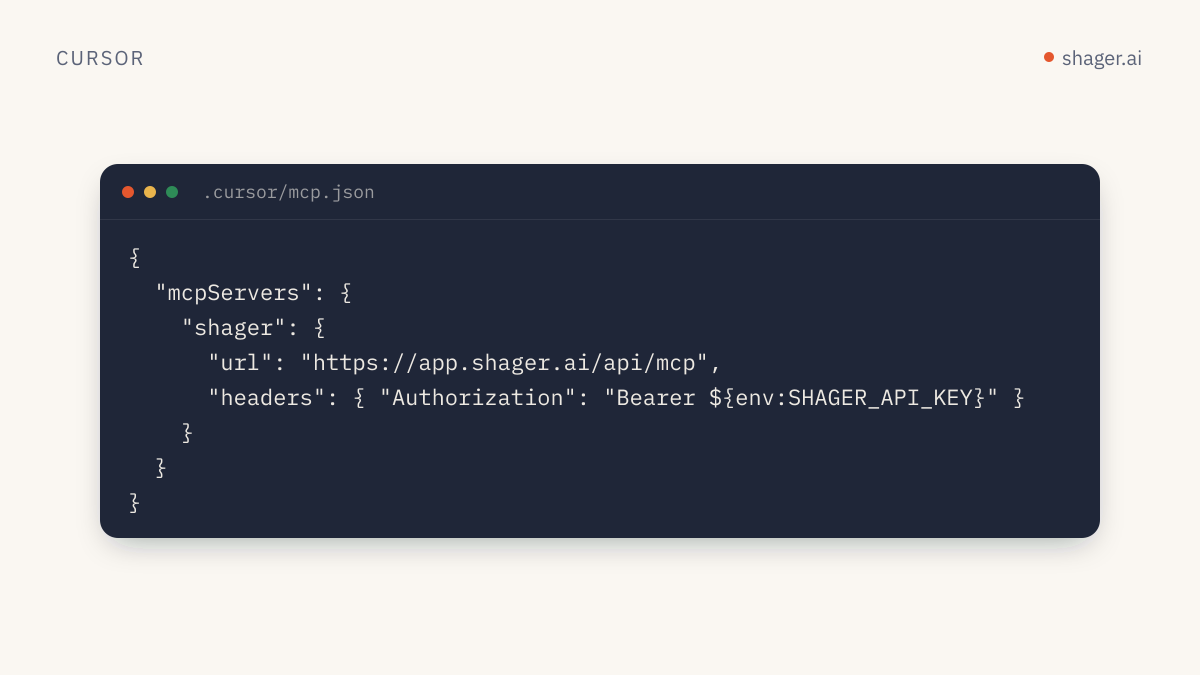
To connect Shager to Cursor, create .cursor/mcp.json in your project (or ~/.cursor/mcp.json for every project) with a shager entry whose url is https://app.shager.ai/api/mcp and whose headers set Authorization to Bearer ${env:SHAGER_API_KEY}. Cursor resolves the variable from your environment, connects over HTTP, and the agent gets Shager's tools. No local server, no bridge.
Cursor is an interesting place to run distribution from because the source material already sits in the repo: changelogs, docs, release notes, blog drafts. This guide sets up the connection properly and then uses it for that job.
What does Cursor's MCP config look like for a remote server?
Cursor's MCP documentation shows a remote server as a url plus an optional headers object, and documents ${env:NAME} interpolation in the url and headers fields. It also lists two locations: .cursor/mcp.json in a project for project-specific tools, and ~/.cursor/mcp.json in your home directory for tools available everywhere.
For Shager:
{
  "mcpServers": {
    "shager": {
      "url": "https://app.shager.ai/api/mcp",
      "headers": {
        "Authorization": "Bearer ${env:SHAGER_API_KEY}"
      }
    }
  }
}
And in your shell profile:
export SHAGER_API_KEY="shgr_live_your_key_here"
Cursor reads environment variables from the process that launched it. On macOS, an app opened from the Dock may not see variables you set in ~/.zshrc. If the server fails with a 401 even though the key is right, quit Cursor and launch it from a terminal with cursor . to confirm that's the cause.
Project file or global file?
| Location | Good for | Watch out for |
|---|---|---|
.cursor/mcp.json in the repo |
A marketing site or docs repo where content work happens | Commit it only with the ${env:...} form, never a literal key |
~/.cursor/mcp.json |
You want Shager available in every workspace | Every project's agent can now reach your Shager workspaces |
For an agency developer who maintains several client sites, the project file is usually the better fit. The repo for client A shouldn't have an agent that can casually draft into client B's workspace. Pair the project file with a key whose organization only holds the workspaces that make sense for that repo, or at least name workspaces explicitly in your prompts.
Where does the key come from?
A human creates it at https://app.shager.ai/dashboard/agents and picks scopes. For work inside an editor, read plus write is the right default: the agent can upload media and create drafts, but Shager refuses to schedule or publish without the publish scope. If you're prototyping and don't have an account yet, an agent can create a sandbox through self-signup; the recipe is published at shager.ai/auth.md.
How do you check that Cursor sees the tools?
Open Cursor's MCP settings and look for shager with a connected status and its tool list: whoami, list_workspaces, create_workspace, list_channels, create_connect_link, list_groups, create_group, upload_media_from_url, create_post, schedule_post, request_approval, get_post, list_posts, cancel_post and get_analytics. If the server shows an error, the three usual causes are a missing environment variable, Bearer missing from the header value, or a JSON syntax error in the file.
Then, in the agent chat:
Call shager whoami and tell me which scopes this key has.
The workflow: a changelog becomes per-account drafts
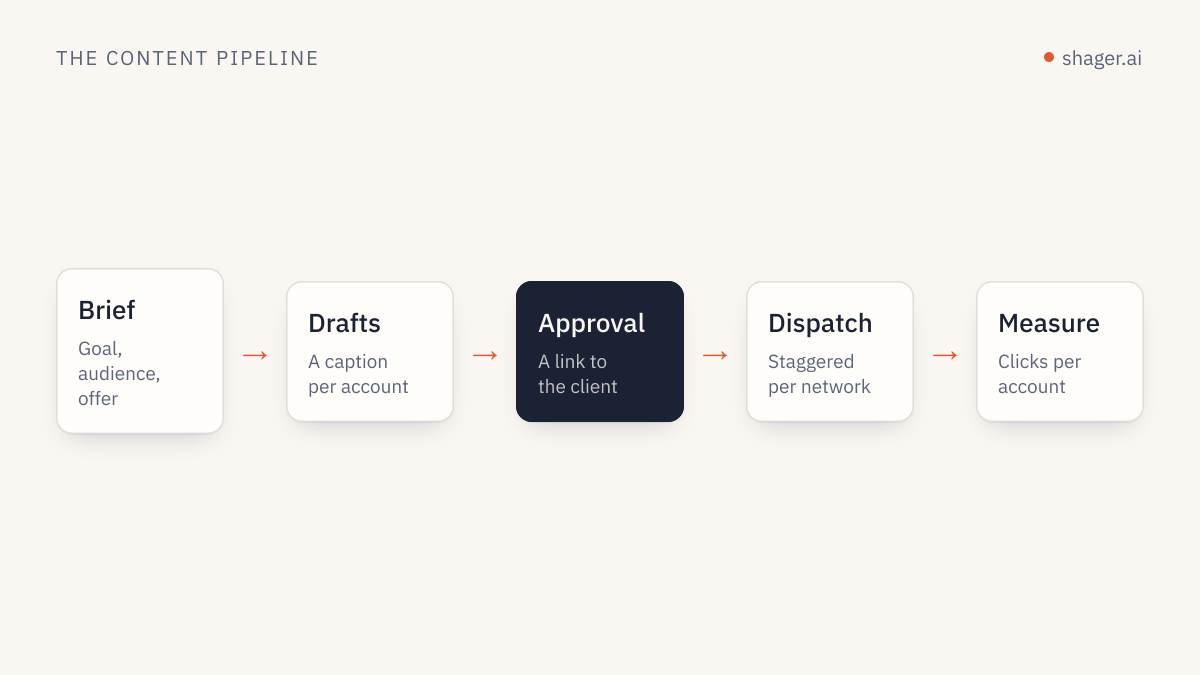
Here is a concrete job that fits Cursor well. Say you maintain the site for a software reseller with twelve regional partner pages on Facebook and Instagram. Every release, someone rewrites the changelog into social posts by hand. With Shager connected, the agent can do the first pass.
Read CHANGELOG.md and take the entry for v4.2 only.
In Shager workspace "Brightline Partners":
1. list_groups and use the group "Regional partners".
2. list_channels so you know each channel's name and network.
3. Write one short post about v4.2 for a non-technical audience.
4. Create a DRAFT with create_post (no schedule_at):
   group_ids: the "Regional partners" group
   per_channel: a caption per channel that names the region from the channel
   name and varies the opening line; keep facts identical
   cta_url: https://brightline.example/releases/4-2
   campaign: "release-4-2"
   first_comment: "Full notes: " followed by the link
5. Print the post id and a table of channel, caption first line, format.
A few choices in that prompt are deliberate.
Facts stay identical while wording varies. per_channel overrides the caption for each account, which is the recommended pattern. Twelve copies of the same text across related pages is the kind of repetition our piece on avoiding spam blocks when posting at scale warns about, and it reads badly to anyone who follows two of those pages.
The link is tracked per account. Passing cta_url makes Shager create a separate short link and UTM set for every account, with utm_content identifying it. Later, get_analytics returns clicks by account and by post, so the partner in one region can see what their page drove.
The output is a draft. Somebody still reads it in Shager before it ships, either an internal reviewer or the client through an approval link.
What if you'd rather call the API from code?
Sometimes you want this as a script in the repo rather than a chat. A release workflow in CI, for example, should not depend on someone opening Cursor. The same operations are exposed over REST, described in the OpenAPI document. The equivalent of step 4 above in TypeScript:
const API = "https://app.shager.ai/api/v1";
const headers = {
  Authorization: `Bearer ${process.env.SHAGER_API_KEY}`,
  "Content-Type": "application/json",
};

const res = await fetch(`${API}/workspaces/${workspaceId}/posts`, {
  method: "POST",
  headers,
  body: JSON.stringify({
    caption: defaultCaption,
    group_ids: [groupId],
    per_channel: captions.map((c) => ({ channel_id: c.channelId, caption: c.text })),
    cta_url: "https://brightline.example/releases/4-2",
    campaign: "release-4-2",
    first_comment: "Full notes: https://brightline.example/releases/4-2",
  }),
});

const body = await res.json();
if (!res.ok) throw new Error(`${body.error.code}: ${body.error.message}`);
console.log(body.data.id, body.data.status); // a DRAFT post
Responses are wrapped in { "data": ... } and errors in { "error": { "code", "message" } }, so the error handling is the same everywhere. The REST quickstart covers the full sequence.
Rules worth adding to the project
Cursor supports project rules, and a short one saves you from repeating constraints in every prompt. Something like:
When using the shager MCP server:
Never pass schedule_at unless I explicitly give a date and time.
Always use per_channel captions when posting to more than one account.
Always pass cta_url for any link instead of pasting raw URLs into captions.
Use ISO 8601 with an offset for any time, in the workspace timezone.
Rules are guidance to the model, not enforcement. The enforcement is the key's scope. Keep publish off the editor key and the first rule can't be broken even if the model ignores it.
FAQ
Does Cursor support Shager without OAuth?
Yes. Cursor sends whatever headers you configure, so the bearer API key works directly. Shager's OAuth for MCP is coming, but Cursor users don't need to wait for it.
Can I use the same key in Cursor and Claude Code?
You can, but separate keys are better. Each call lands in Shager's audit log under the key that made it, and separate keys let you revoke one tool without breaking the other. The Claude Code setup has its own guide in this series.
Will the agent post immediately if I say "publish this"?
Only if the key has the publish scope, the account has been claimed by a human, and the workspace doesn't require client approval first. With a read and write key, the request fails with a clear 403 and nothing goes out.
Next step
Once the connection works, the bigger win is a repeatable procedure rather than clever prompts. Read how to build a Claude skill for Shager for the structure, since the same instructions translate well into Cursor rules, and keep the agents page open as the reference for every tool and field.